VBA Copy Protection

To provide the most strong and reliable VBA code copy protection, the DoneEx XCell Compiler
uses 2 different approaches which are combined into one solution when you select all options of 'VBA Protection'.

Blocking access to VBA code.

Option 'Unviewable VBA code' blocks access to the VBA project and disables VBA debug mode.
After applying this option, VBA Project and VBA code will be unviewable and unavailable in compiled application.
Any attempt to trace your VBA code will fail because VBA debug mode will be disabled.

VBA code modification.

Two options, the 'Code obfuscation'and 'Literals removing', modify the VBA code in a way that remains VBA code workable but becomes crabbed and incomprehensible.
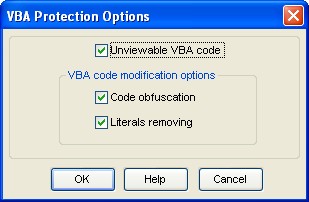
DoneEx XCell Compiler's VBA copy protection options form.

After applying 'Literals removing' option, the modified VBA code becomes tied to the XCell Compiler run-time library and will be workable in compiled application only.

After applying all 3 options simultaneously you will get the strongest VBA code copy protection which has the following advantages:

  • The VBA code is unviewable and inaccessible from Excel VBA project.
  • The VBA debug mode is disabled, so it is impossible to trace the VBA code.
  • All comments and empty lines are removed from the VBA code.
  • The VBA code with removed literals will not work outside of compiled application.
  • The VBA code is modified so it is incomprehensible and unrecoverable.

Below you may see example of code transformation after applying both code modification options.

Original VBA code:

Original VBA code before applying VBA code modification options

After applying both code modification options, 'Literals removing'  and 'Code obfuscation', the VBA code is:

Obfuscated VBA code with removed literals. Incomprehensible and unrecoverable.

Here is the image shows how VBA Project with blocked access to vba code looks:
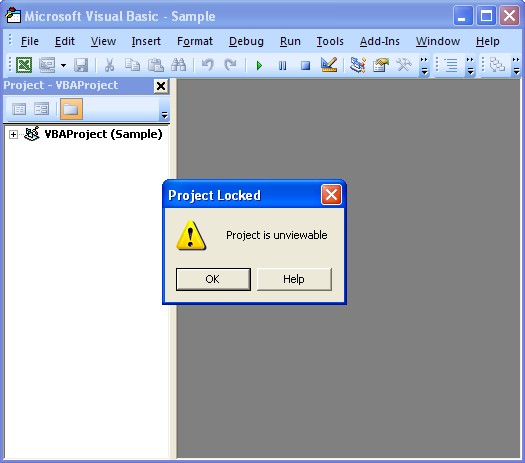
Inaccessible VBA code.


Excel Copy Protection